Service Contract Act (SCA) Compliance Software
Credit the benefits you pay against the Health & Welfare rate, employee by employee. Pay out every shortfall as cash in lieu or a retirement contribution, recoup any excess through payroll, and keep the record for every period. Built for contractors who run compliance in-house and provide real benefits.
Software, not a benefit plan. Flat fee, not per employee.
Rivera, Dana
EMP-014 · W912DY-25-C-0087
September 2026
WD 2015-4539 Rev 32
The workbook
What the reconciliation looks like at most contractors who keep H&W in-house, and what SimpleFringe does with the same files.
At most contractors who run Health & Welfare in-house, there is one spreadsheet. A payroll export gets pasted into it. Carrier statements get VLOOKUPed in. Hours come across from the ERP or the timekeeping system, task order by task order. Then the formulas credit each employee's employer-paid benefits against the rate on their Wage Determination, pro-rate anyone who split the period across contracts, find who is short and who is over, and set up the cash in lieu or retirement contribution for one and the payroll deduction for the other.
The people who keep that workbook put the run at a few hours to a full day, before any retroactive catch-up after a modification or an off-cycle termination payout. It lives in operations at some companies, HR at others, finance at the rest. It was built years ago and it works, so it never gets replaced.
SimpleFringe takes the same exports and does the calculation itself: every employee, every contract line, every rate on every Wage Determination you hold, pro-rated to the day, with the shortfall and its payout, or the excess and its recoupment, worked out and the record kept for every period.

Built by the person who answered the H&W questions. Matt Corzine spent thirteen years at GSA National, five of them as President, working with hundreds of contractors on Service Contract Act compliance. SimpleFringe is the tool he wished they had.
In production with contractors managing SCA fringe in-house. About Matt
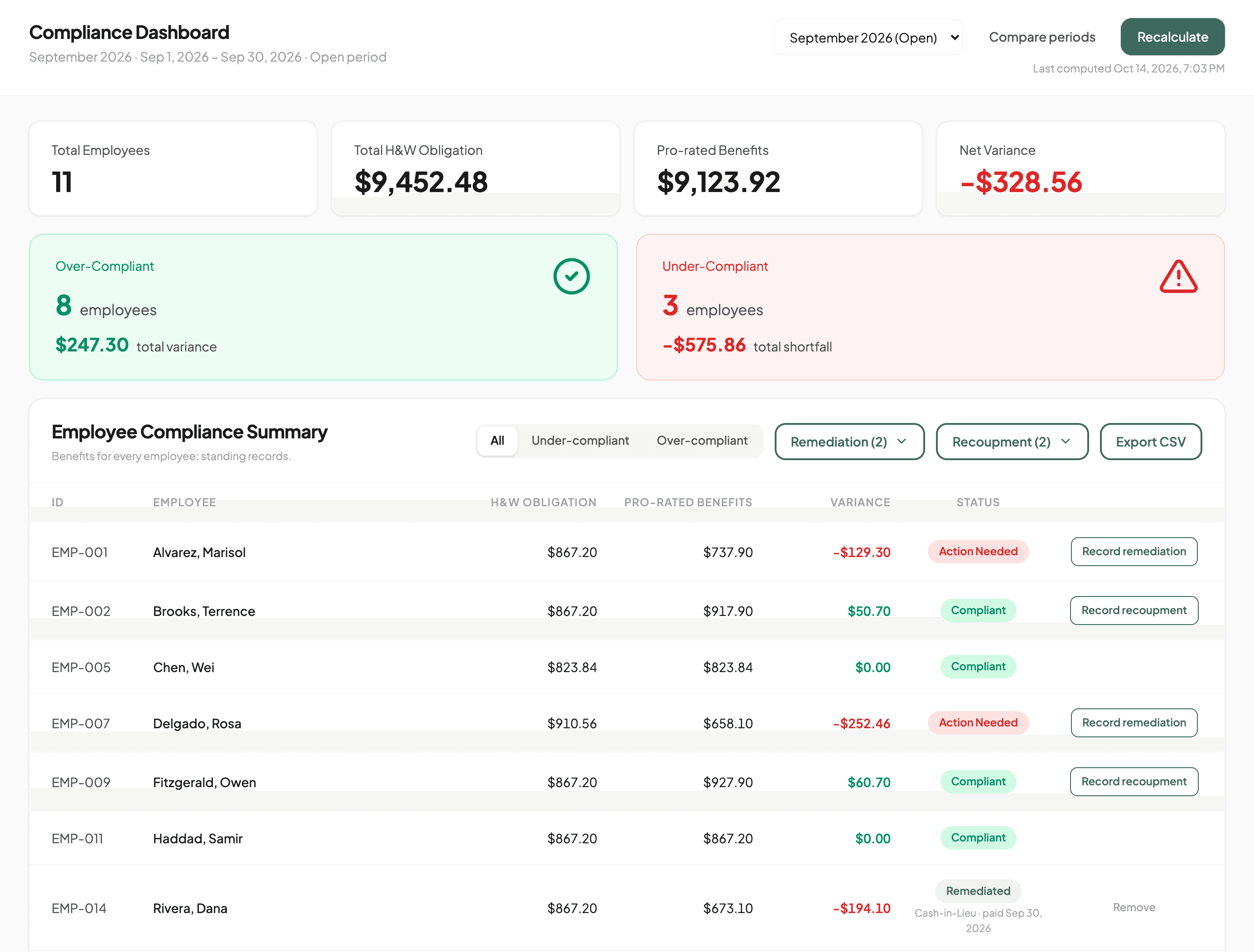
One period, every employee, one screen
Run the analysis for the period and the dashboard shows who is short, who is over, and by how much. Every figure comes from a stored snapshot with a timestamp, so what you saw on the 12th is still what you saw on the 12th.
What it does, on real screens
Every image below is the product on demo data, cropped to the part that matters.
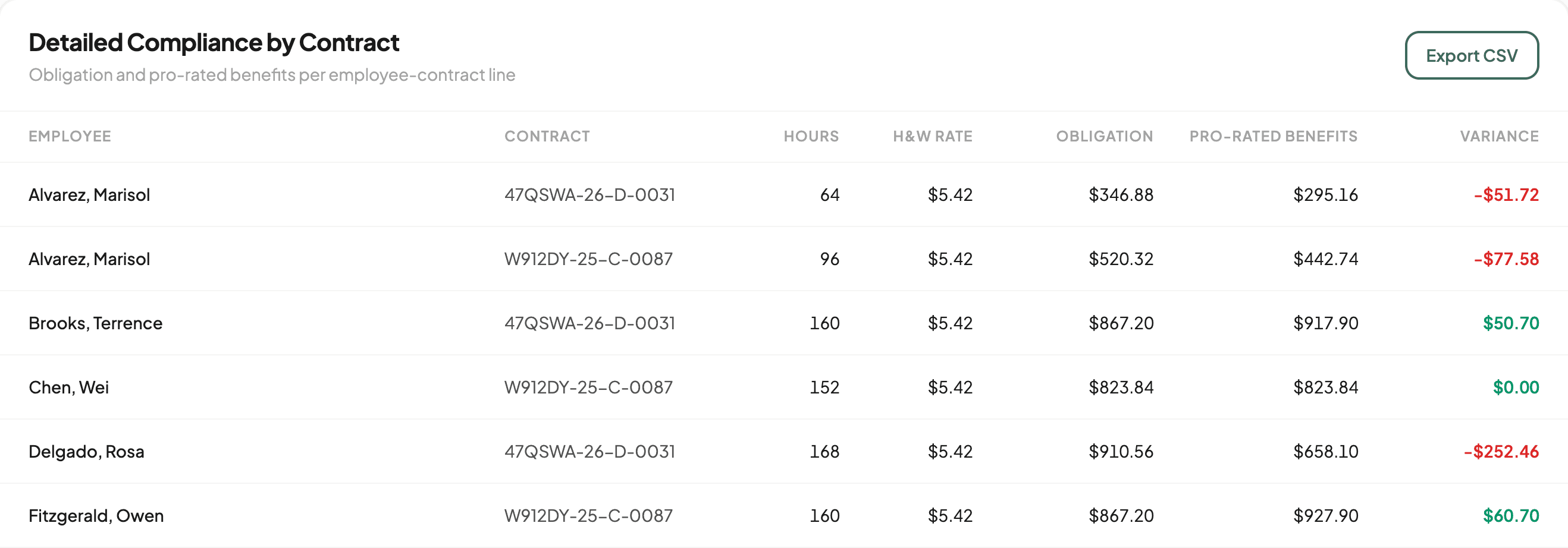
Pro-rating you can see
When an employee splits a period across two contracts, each contract line gets its share of the benefits by hours, at that contract's own rate. A benefit change mid-period, a plan switch or a life event, is prorated to the day.
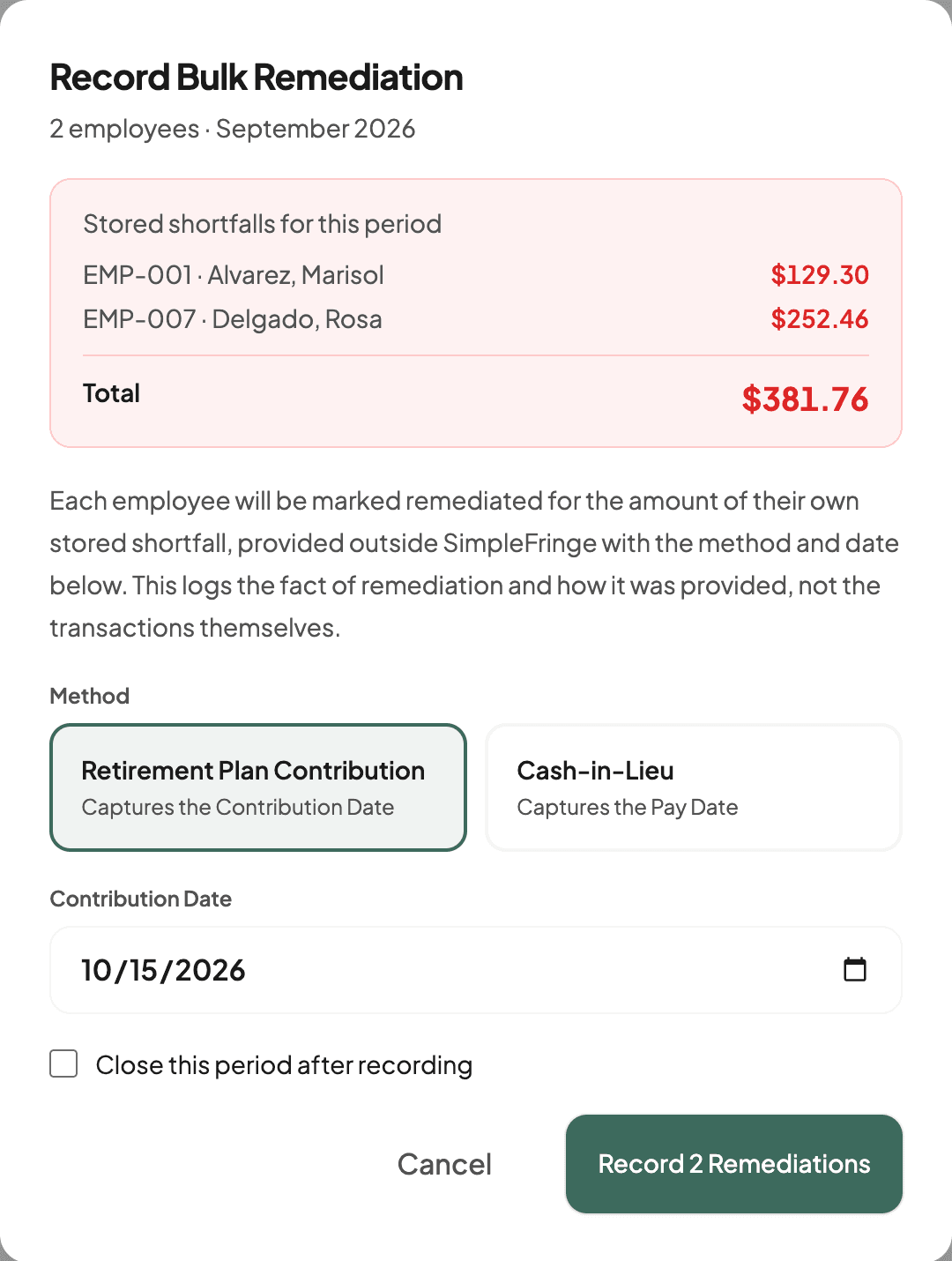
Shortfalls, one at a time or all at once
Record how each shortfall was provided, a retirement plan contribution or cash in lieu, with its date. Remediate All records every open shortfall in the period in one step and can close the period behind it. Export the list as a CSV for payroll.
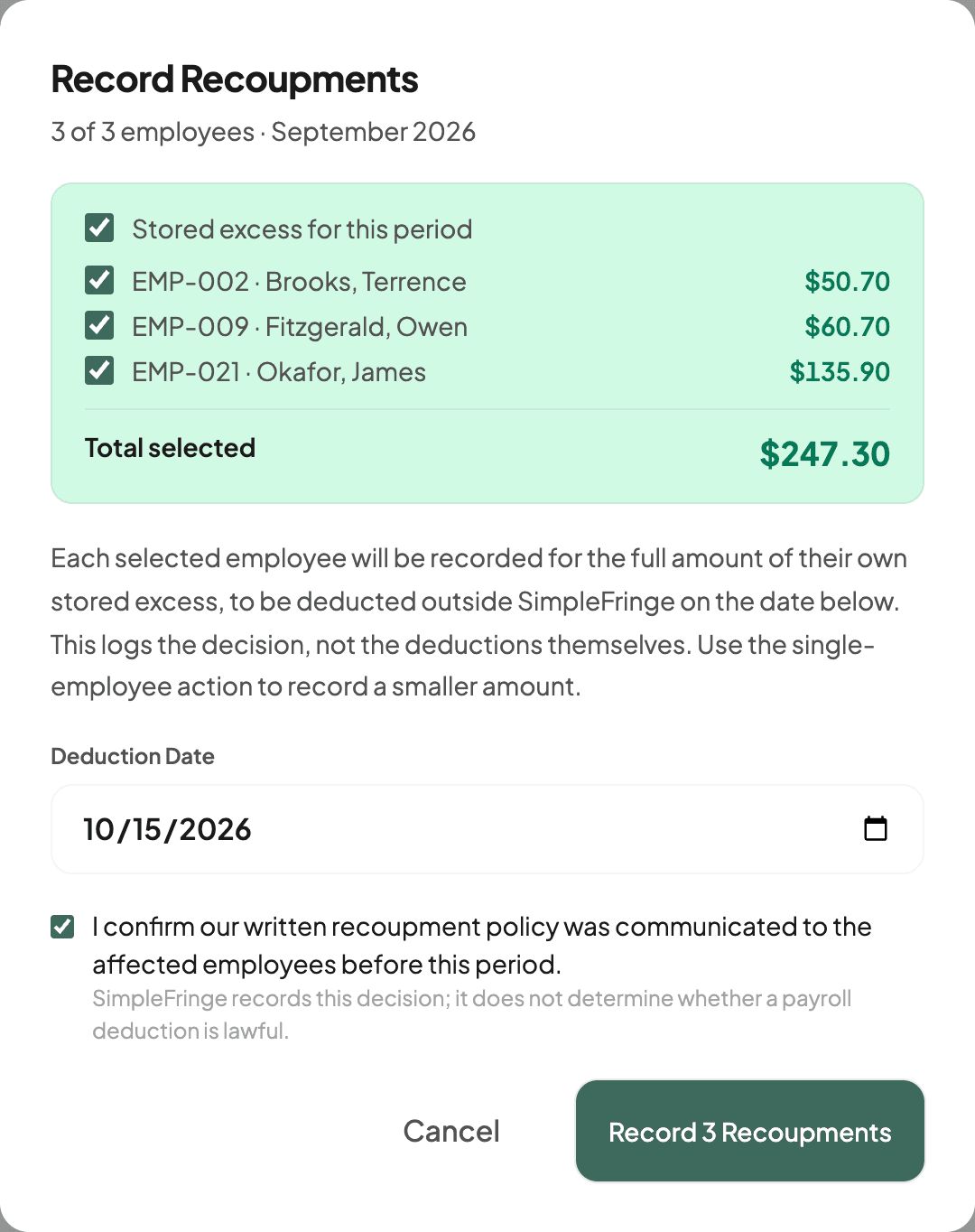
Recoupment, when benefits came out over
When an employee's employer-paid benefits came to more than the obligation, record the excess to recoup through a payroll deduction: one employee or every eligible one, with the deduction date, after confirming your policy was communicated in advance. SimpleFringe refuses to record it from out-of-date figures. Export the deductions as a payroll CSV.
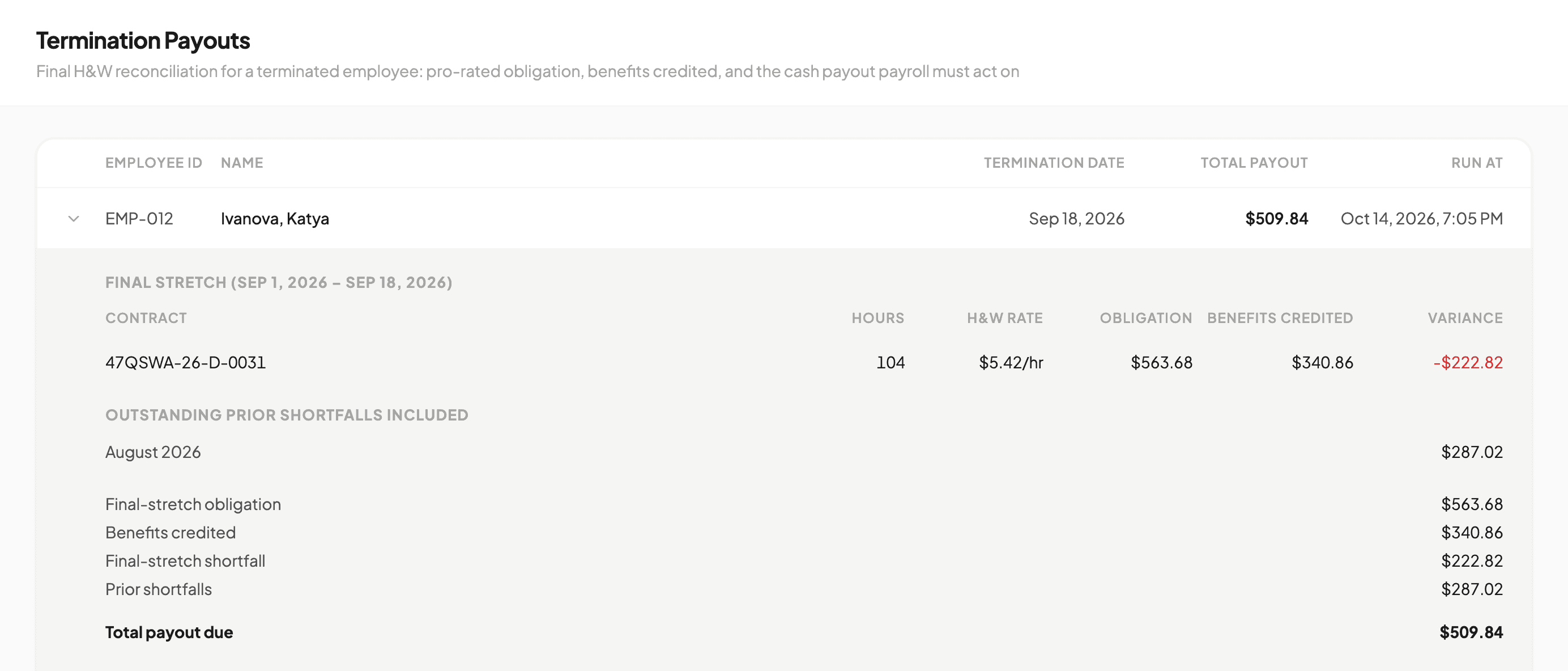
Termination payouts, one employee or a wave
Some states require final pay the same day. Run the final H&W reconciliation on demand: the final-stretch shortfall plus any outstanding prior shortfalls, in one payroll-ready number, with a final-pay deadline reference for all 50 states and DC. One employee from the Employees page, or a whole wave from a CSV, with the same math either way.
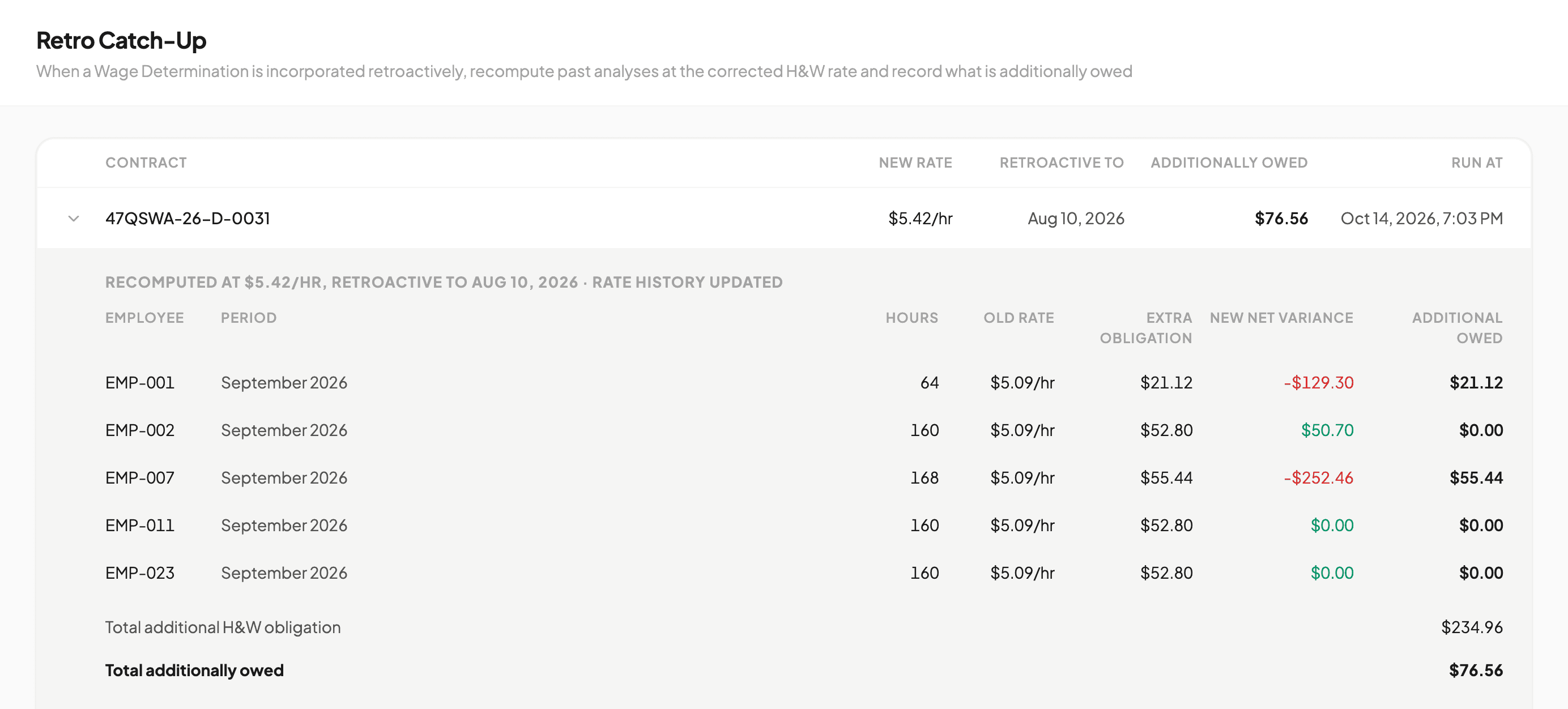
Retroactive rate catch-up
Contracting Officer incorporated a Wage Determination revision months late? Recompute every affected period at the corrected rate and get exactly what is additionally owed per employee. Benefits already provided are credited, and past records are never rewritten.
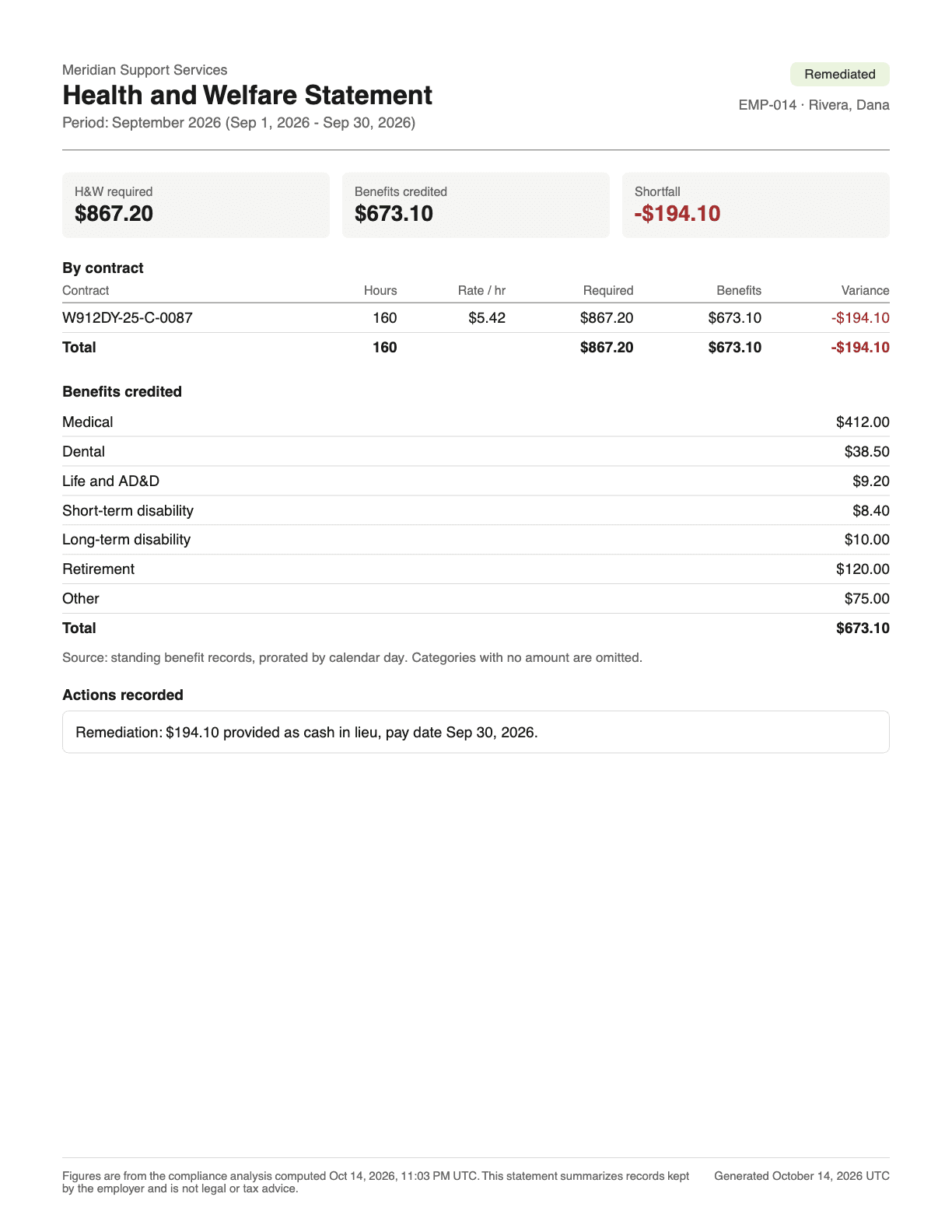
A statement for every employee
One page per employee per period: hours and rate by contract, the benefits credited, the shortfall or excess, and any payout or deduction recorded, stated as fact. Download one, a selection, or the whole period as a combined PDF or a zip. The employee who asks how the H&W line on their stub was figured gets the math, not a shrug.
Wage Determinations, at the revision you incorporated
Record each Wage Determination and revision with its SAM.gov link. Attach several to one contract, each at the revision your Contracting Officer actually incorporated, not just the newest.
CSV import with validation
Bring hours and benefits over from your payroll and benefits exports. Every row is checked against the same rules as manual entry, and nothing commits until you confirm. Prefer white-glove? Concierge onboarding is included.
Compare any two periods
See what changed between this period and the last: who went short, who came back, who is new or gone, ranked by the size of the swing. Export it the same way as the period itself.
Software, not a benefit plan
Your H&W obligation is a dollar figure, and there is more than one compliant way to meet it. SimpleFringe does not sell you a plan. It proves the benefits you already provide add up, per employee and per contract, whether that is your own health plan, a retirement contribution, cash in lieu, or a mix. Flat fee, no lock-in, and you keep control of your fringe dollars and plan design. It works alongside a TPA or insurer you already use, checking the numbers independently.
Letting each employee choose the benefits that fit their family, and paying out every dollar of the difference, is the model employees love and recruiters win with. It is also the hardest model to administer: per-employee variances, employer-paid portions only, proration across contracts, life-event changes mid-month. SimpleFringe exists so running that model does not cost your ops team a week every month.
Built to hold up under scrutiny
- Contract rate histories
- A full H&W rate history for every contract. If a period has hours and no rate covering it, SimpleFringe stops and names the contract, rather than computing a zero.
- Snapshots that never rewrite
- Every analysis is stored with the time it was computed. Change an input later and the snapshot shows as stale until you re-run it; statements and payroll exports will not come from stale figures.
- Lockable periods
- Close a period and it is read-only until you reopen it, so finalized numbers stay finalized.
- Full activity log
- Every data change, analysis run, remediation, recoupment, and export, with who and when. Dollar amounts and hours are never written to the log itself.
Questions contractors ask
How much does it cost?
A one-time implementation fee and a flat monthly fee. Not per employee, not per contract, so winning a big award does not triple your software bill.
What size contractor is this for?
The model matters more than the headcount. If you offer real benefits, credit what you pay toward the obligation, and true up the difference, SimpleFringe is built for you, whether you have ten SCA employees or several hundred. If you force a single package on everyone or pay the entire fringe as cash, a spreadsheet may be enough. If a trust or TPA already handles everything and it is working, we will tell you that too.
How is this different from our spreadsheet?
Same inputs, no formulas to maintain. Every contract carries its own rate history, every employee's benefits are credited and prorated by the same rule every time, and every run is stored with a timestamp. If a period has hours and no rate, it stops and tells you instead of computing a zero.
How do we get our data in?
CSV exports from your payroll and benefits systems, through a four-step import that validates every row before anything commits. Or type it in. New customers can hand us the exports and we do the setup.
Our prime will not allow cash in lieu. Can shortfalls go to a retirement plan?
Yes. The payout method is a per-remediation choice, not a system setting. Cash on one contract, retirement contributions on another, or switch when a prime or agency requires it, without changing how the obligation is calculated.
An employee's benefits cost more than the H&W owed. Can we recoup the difference?
SimpleFringe shows the excess per employee and lets you record a payroll deduction for it, once you confirm the recoupment policy was communicated to employees in advance. It records your decision and the deduction date. Whether a deduction is lawful in your state is a question for counsel, and the app says so.
Which Wage Determinations does it work with?
Odd-numbered Wage Determinations, which cover the large majority of service contracts. A single contract can carry several, for different localities or occupation groups, each attached at the revision your Contracting Officer incorporated.
Is this a replacement for a TPA?
No. SimpleFringe is a calculation and tracking tool, not a Third-Party Administrator. It does not administer benefits or file reports on your behalf. It is the tool that lets you stay on top of compliance yourself, at a fraction of the cost of a TPA.
How do you protect our data?
NIST SP 800-171 Rev 2 as the design reference. Encryption at rest and in transit, U.S.-based infrastructure, invitation-only access with owner and member roles, time-based MFA your owner can require for everyone, and row-level security in the database so no query can reach another company's compliance records. SimpleFringe holds no CMMC certification and is not FedRAMP authorized, so it is not a system for Controlled Unclassified Information; the data it works with is your own employment and payroll records. A Data Privacy Agreement comes before any data changes hands. Full scope statement on request.
See it on your own data
A 30-minute walkthrough on demo data, or on your own if you bring an export. If your model is a better fit for a trust, Matt will tell you.
Prefer email? matt@simplefringe.com